DevOps with VMs
Context
We will see in practice how to deploy an application as code on Linux VMs by deploying:
- PostgreSQL with the PostGIS extension for storing geographic data.
- GeoServer to serve this data via WMS and WFS.
We will call the resulting system GeoStack (to have a name for the dedicated deployment repository: geostack-deploy).
Initial Architecture
We will start with the following trivial architecture:
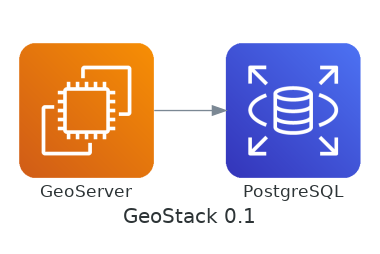
We will study its limitations later.
Creating a Deliverable
Do not build the application in PRODUCTION
Building an application on PRODUCTION leads to many problems:
- The risk of not being able to redeploy the application in case of a problem (e.g., disappearance of a dependency, unavailability of a service,...)
- An increase in deployment time (build on each instance)
- The need to access non-exposed resources (thus requests for exceptions on firewalls)
- The need to access private resources (thus authenticating with git, npm,...).
- ...
NB: The use of a
package-lock.json,composer.lock,... file will only protect you against an unexpected version upgrade of dependencies.
Produce and store a deployable deliverable
For deploying an application in PRODUCTION, it is important to:
- Tag a version at the source code manager level (e.g.,
v0.1.0). - Produce a deliverable for this version of the code.
- Store this deliverable.
- Deploy a securely stored deliverable to PRODUCTION.
(cf. The 12 Factors - V. Build, Release, Run)
This principle does not prohibit continuous deployment of a version corresponding to the main branch in a DEV environment.
Package your own application
In cases where a deliverable needs to be created for one's own application, we will note that:
- There is a wide variety of possible deliverable formats depending on the technologies and target OS (cf. formats supported by Nexus which allows creating different types of repositories)
- Packaging applications like PostgreSQL is a profession (building and maintaining .deb or .rpm according to best practices is not trivial).
- In the case of interpreted languages (NodeJS, PHP...):
- We can be content with a simple archive as a deliverable (a .zip with the code of the version + dependencies)
- We can also easily produce .deb files with tools such as FPM (1)
We will not go into too much detail (spoiler: we will see how the use of containers solves this problem)
(1) See github.com - IGNF/validator - build-deb.sh for a trivial example (without pre/post-installation script).
Choose already packaged services
In this case, we are lucky:
- PostgreSQL provides binaries for different systems. We even have an APT repository that will allow using
apt-get installandapt-get upgrade - GeoServer also provides ready-to-use deliverables.
Creating VMs
The variety of APIs
There is a wide variety of hosting offers providing an API to control:
- Virtual machines (compute)
- Private networks (network)
- Storage (storage)
- Service exposure (Load Balancer)
- A domain name / DNS
- ...
We will find concepts specific to each solution in these APIs (cf. OVHCloud API, Scaleway API, DigitalOcean API (2.0)...)
Terraform
To manage an infrastructure "as code" in production without programming calls to these APIs, we can rely on Terraform which provides:
- A declarative language for creating resources (virtual machine, network,...)
- Support for a large number of providers including:
- Public clouds: AWS, Azure, Google Cloud Platform,...
- Private clouds: vsphere, openstack,...
We will initially content ourselves with inspecting an example of creating a Google Cloud VM with Terraform: google_compute_instance.
Vagrant
For this course, we will rather use Vagrant which is also developed by HashiCorp and is the equivalent of Terraform for development environments.
We use the mborne/vagrantbox repository to create VMs described in a file Vagrantfile with a command (vagrant up):
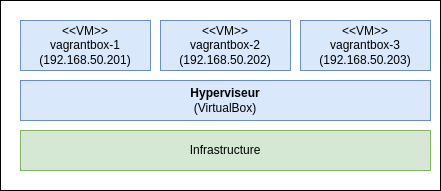
We will emphasize that:
- The main difficulty addressed in the mborne/vagrantbox repository is the optional use of an outgoing proxy with the vagrant-proxyconf plugin.
- A Vagrant sheet explains how to create your own
Vagrantfile. - Vagrant is also practical for creating a Linux DEV VM with a graphical environment (
apt-get install ubuntu-desktop) - Here we create VirtualBox VMs but Vagrant supports other hypervisors (e.g., KVM)
- There is a public repository of VM images for vagrant.
Application Deployment
Principle
With Vagrant and Terraform, we have tools capable of creating our VMs as code.
We still need to find a solution to do the same for deploying our applications.
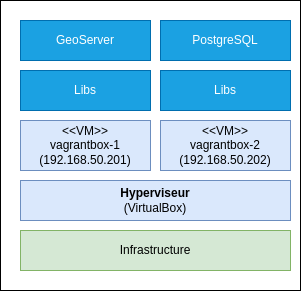
Configuration management tools
Configuration management tools are the most suitable for installing and configuring our applications. The most well-known are:
The choice of Ansible
We will rely on Ansible, which is a solution:
- Free, OpenSource and referenced in the SILL (1)
- Based on the use of the YAML format
- Implemented in Python
- Allowing the use of a deployment orchestrator (e.g., AWX, Jenkins, GitLab-CI,...) without imposing it.
(1) https://code.gouv.fr/sill - Interministerial Base of Free Software (which is also an excellent source of information).
The main Ansible executables
We will find several executables with Ansible:
- ansible which will allow, for example, to run a command on the machines in an inventory.
- ansible-playbook which will be used to process a set of tasks described in YAML format.
- ansible-galaxy which will allow downloading shared roles to build your playbooks (see galaxy.ansible.com).
- ansible-vault which will allow encrypting secrets.
The operating principle of Ansible
While it will be necessary to think in some cases, we will note that very often, the translation of commands into YAML to call the corresponding Ansible module will be trivial:
sudo apt-get update
sudo apt-get install nginx
...becomes:
- name: Install nginx
  apt:
    name: nginx
    state: present
    update_cache: yes
GeoStack Deployment with Ansible!
Properly presenting Ansible concepts would require several sessions.
The idea of this course is not to train in writing Ansible scripts, but rather to discover Ansible using the following examples:
- mborne/vagrantbox - Ansible - QuickStart which applies a post-processing after creating vagrantbox VMs.
- mborne/geostack-deploy which ensures the deployment of GeoStack with Ansible.
We will use the Ansible installation procedure in the corresponding appendix, which points to useful resources for those who wish to delve deeper.
Conclusion on Ansible
We will remember that Ansible allows describing the deployment of an application as code with a YAML file that can be used as follows:
# deployment in QUALIF
ansible-playbook -i inventory/qualif playbooks/my-application.yml
We will emphasize Ansible's contribution to:
- Facilitate the writing and maintenance of deployments (YAML and numerous available modules making procedures readable even without Ansible knowledge).
- Manage parameters according to environments (especially compared to
install-geoserver.shscripts) - Allow the reuse of complete deployment scripts (downloading roles with
ansible-galaxy, composing playbooks from roles,...) - Process actions only in case of change (e.g., avoid unnecessary restarts)
Resulting Process
In terms of role distribution, we could, for example, arrive at the process opposite after the adoption of tools by DEV and OPS.
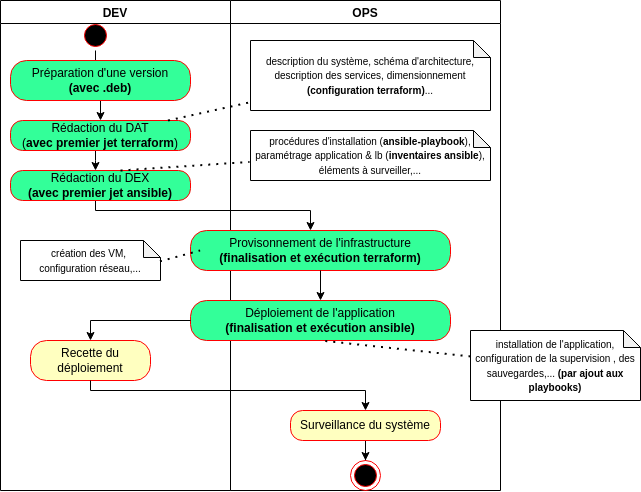
What's Missing?
Security!
We could not proceed like this with VMs exposed on the internet:
- Our VMs would quickly become the target of numerous bots scanning the web (see illustration of SSH attacks)
- We would end up on https://www.shodan.io
At a minimum, it would be necessary to:
- Configure a local firewall (for example with ufw)
- Configure fail2ban to block brute-force attacks on SSH
- Harden the VM configuration (cf. dev-sec.io - DevSec Hardening Framework)
- ...
We will note the existence of an alternative to fail2ban: CrowdSec where suspicious IPs are shared. We will ensure compliance with the GDPR with this type of tool.
The essential reverse proxy
It would also be necessary, at a minimum, to switch to an architecture of the following type by adding a reverse proxy ("lb"):
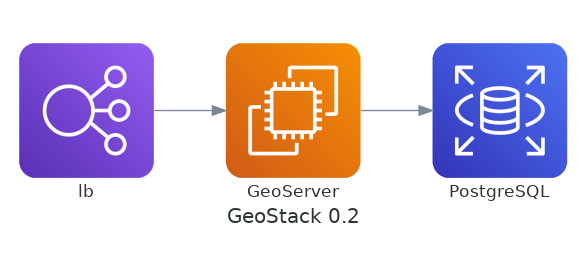
With a reverse proxy, we could, for example:
- Publicly expose only GeoServer's WMS and WFS services (
/wms,/wfs) - Expose GeoServer's administration interface (
/geoserver) with IP filtering.
The implementation of HTTPS
As long as we are on HTTP, the GeoServer administrator's password will circulate in plain text on the network. It would therefore be appropriate to implement HTTPS to remedy this. We will emphasize that:
- HTTPS could be implemented at the reverse proxy level
- HTTPS implementation requires purchasing a certificate or generating one with Let's Encrypt
- For services exposed on the INTERNET, there are tools to test and harden the TLS configuration (ciphers, security headers, certification chain...) such as:
- https://www.ssllabs.com/ssltest/
- https://www.sslshopper.com
- For non-exposed services (intranet, RIE,...), it will be necessary to master
opensslto diagnose and detect these problems.
Observability
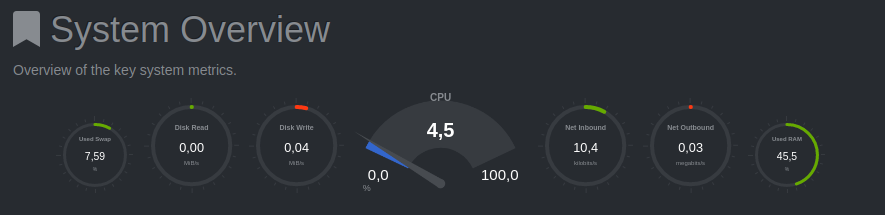
To be able to operate these two components, it would be necessary to:
- Configure log centralization
- Configure a supervision system
Backups
As it stands, if one of our machines catches fire: The data is lost. It would therefore be important to adopt a backup strategy, and several options are possible:
- Rely on VM snapshot mechanisms or their volumes.
- Regularly export and externalize only the application data, for example by creating an archive with:
- A backup of the PostgreSQL database (
pg_dump) - GeoServer files (
GEOSERVER_DATA_DIR).
See Back up and restore GitLab where the
gitlab-backup createcommand allows generating a backup of the database and repositories.
We will emphasize that a data-only export approach will be preferable to the snapshot approach:
- It will facilitate restoration tests outside of production and migrations (snapshots include configuration elements)
- It will guarantee the consistency of backups (synchronizing backups of 2 VMs is delicate).
- It will be simpler to verify that a backup is not corrupted (which is more delicate with snapshots)
Incremental backups
With large volumes, an incremental approach will be possible and interesting. We will indeed be able to go back in time by relying, for example, on:
(1) We will find its integration in Velero which allows backing up Kubernetes clusters.
Resilience
For critical systems or those with large volumes, it will not be acceptable to have to wait for the end of a full backup restoration for the system to restart after a problem (1).
In this regard, we could implement redundancy mechanisms at the GeoStack component level with replication strategies specific to each application:
(1) See Chaos_Monkey and its variants (Chaos Gorilla, Chaos Kong) for the corresponding tests imagined by Netflix.
We will emphasize that the exercise is far from trivial with GeoServer and PostgreSQL services and will better understand why certain services are designed to natively address this problem (ElasticSearch, Cassandra, etcd,...)
A DevOps capable of handling all these subjects...
Here is an illustration of the DevOps profile capable of handling all these subjects:

A sheep with 1000 legs
(content generated by AI with bing)
As it stands, by giving the keys of an IAAS to DEV teams, one will have to find one per development team...
The Essential Hosting Zone
The need to address these problems globally
In reality, it is illusory to hope to address these issues homogeneously at the level of each application. Effectively addressing these issues will require establishing a framework for hosting applications.
Deployments will therefore generally be carried out in a hosting zone (1) designed for hosting applications.
(1) The name will vary depending on the organizations and hosting solutions: Landing zone (AWS), technical operating base,...
The main components
In this hosting zone, we will find, for example, the following architecture with component mutualization exploited by several applications:
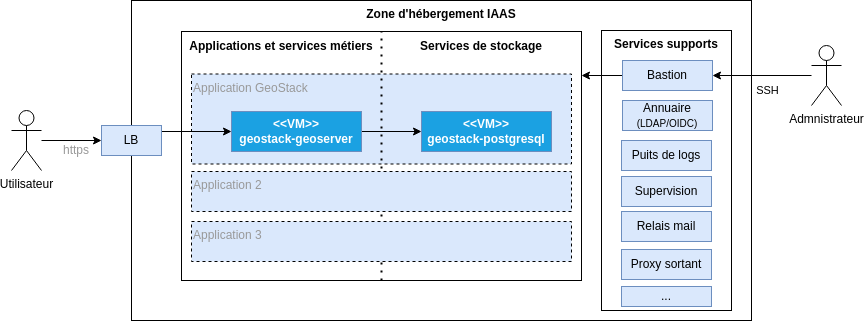
NB: Providing special treatment for storage services will simplify the implementation of a backup plan and a disaster recovery plan (DRP)
The delicate recourse to a dedicated team...
To cope with the complexity and diversity of subjects, we will agree that it will be difficult to avoid resorting to dedicated teams for the construction and operation of the hosting zone.
We will emphasize that it will then be possible to specify the roles of DEV and OPS with, for example:
- PlatDev and PlatOps in charge of the hosting zone components
- AppDev and AppOps in charge of business applications
However, we will note that the recourse to a dedicated team brings us back to the original problem addressed by DevOps: The separation between the teams in charge of applications and the teams in charge of the hosting zone.
It will be necessary to ensure that the technical framework and working method allow for the automation of deployments under good conditions:
- The need to resort to a ticket to configure a single element (e.g., add a VM behind the LoadBalancer) will be enough to undermine automation efforts.
- The slightest unexpected behavior will be a source of cohabitation problems between the application teams and the team in charge of the hosting zone.
Establishing a "as code" framework and being precise about responsibilities (1) and requests will be essential:
- With "I want regular updates", the team in charge of the hosting zone will potentially add as a bonus an
rm -rf /etc/apt/sources.list.d/*to reconfigure its only repositories. - With "I want regular execution of
apt-get update && apt-get upgrade -y", there will be less room for fantasy.
(1) In practice, we can list the different actions to be processed (create VMs, install and configure antivirus, update system packages, install applications,...) and specify who processes, who validates, who is consulted, and who is informed using a RACI matrix.
Docker and Kubernetes to the rescue
We will see later how:
- Containers solve the problem of shared responsibility at the VM level by embedding application dependencies in images (1).
- Kubernetes addresses this problem at the scale of a hosting zone, for example by partitioning applications (concept Namespace) and allowing application teams to specify external URLs (concept Ingress for LoadBalancer configuration).
(1) We will pass over the possibility of providing a complete application VM image with a tool such as Packer or even a simple cloud-init file.